Showing posts with label JAVA. Show all posts

Tuesday, 18 March 2014

Mouse handling

This program tells about how to use action Listener methods and its methods along with how to handle the mouse events.whenever you perform such type of functions such as :click,released,drag,move,enter or exit from the window then it reflects your output as by the repaint method:

To Know more about the mouse event functions and its calculations check out the Java Label:

NewClass.java:

import java.awt.event.*;
import java.applet.*;
import java.awt.*;
/*
<applet code="NewClass" width=300 height=100>
</applet>
*/

public class NewClass extends Applet implements MouseListener, MouseMotionListener
{
    String msg=" ";
    int mouseX=0,mouseY=0;
    public void init()
    {
        addMouseListener(this);
        addMouseMotionListener(this);
       
    }
    public void mouseClicked(MouseEvent me)
    {
        mouseX= 0;
        mouseY=10;
        msg="mouse clicked at:"+me.getX()+" ' "+me.getY();
        repaint();
       
    }
    public void mouseEntered(MouseEvent me)
    {
        mouseX=0;
        mouseY=10;
        msg="mouse entered";
        repaint();
       
    }
    public void mouseExited(MouseEvent me)
    { mouseX=0;
        mouseY=10;
        msg="mouse Exited";
        repaint();
       
    }
    public void mousePressed(MouseEvent me)
    {
         mouseX=me.getX();
        mouseY=me.getY();
        msg="Mouse Pressed";
        repaint();
    }
    public void mouseReleased(MouseEvent me)
    {
         mouseX=0;
        mouseY=10;
        msg="mouse Realeased";
        repaint();
    }
    public void mouseDragged(MouseEvent me)
    {
         mouseX=me.getX();
        mouseY=me.getY();
        msg="***";
        showStatus("Dragging mouse at "+ mouseX +" ,"+ mouseY);
        repaint();
    }
    public void mouseMoved(MouseEvent me)
    {
         showStatus("moving mouse at"+ me.getX() + ","+ me.getY());
    }
    public void paint(Graphics g)
    {
        g.drawString(msg,mouseX,mouseY);
    }
}

output:


Java First Applet Program

This given program demonstrate how the Applet works.How the Function get performed?
To run applet Program First we need to initialize the variables,befor that extends the applet class.

First.java:(Created in NET BEANS IDE )
import java.applet.*;
import java.awt.*;

public class First extends Applet
{
    public void init()
    {
       
    }
    public void start()
    {
       
    }
    public void stop()
    {
       
    }
    public void destroy()
    {
       
    }
    public void paint(Graphics g)
    {
        showStatus("applet Started");
    }
 }

To run this program:
$javac First.java
$appletviewer First

OutPut:
 
To get more details follow Java Label....

Applet StartUP

To use Applet in java program or execution can done by only two ways, Before that, Applet are not Stand-alone program.they run either a web browser or an applet viewer provided by JDK (Java Development Kit).

Applet Program does not begin with main() function.It has its own functions such as:
1.void init( ) 
2.Void start( )
3. void stop( )
4. void showStatus( )
5. void destroy( )
6. void paint(Graphics g) defined in AWT component class, where applet will override it.

In Contrast, Swing Applet has different mechanism to execute their program.

To get more details more about java functions : Refer Java Category 


Java Applet

Applet provides more compatibility with Graphical User Interface. You can Add-on more features such as buttons,menu-bars,frames, can be useful to develop different application like games, any software etc.

There are two types of applet in java:
1.Simple applet based on Applet Class ,use the abstract window toolkit(AWT) to provide the graphical user interface.

2. Swing Class Applet "JApplet". It provides the same features as we used in AWT along with some richer function and additional functionality to the AWT function and more compatible with graphics functions.
JApplet inherits Applet .


HTML APPLET Tag

Applet can run on the browser window through <applet> tag and you can get the output as you get in your appletviewer.
The one restriction with appletviewer is it executes only one java program at one time,In Contrast, browser can consists of more than one applet Contains.Let's have a look at how to enroll the applet tag in browser window.
Applet tag with their some alternatives:
<applet
code="name_of_java_class_name"
width=pixels
height=pixels
align=alignment
vspace=vertical_space_pixels
hspace=horizontal_space_pixels

</applet>

To get details about the attributes of applet tag : click on Java Label.


Wednesday, 23 October 2013

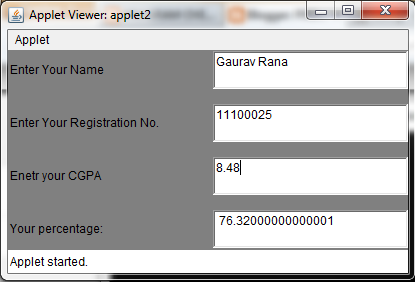
CGPA TO PERCENTAGE CALCULATOR

CGPA TO PERCENTAGE CALCULATOR

Program: To calculate percentage from CGPA

Program Code:

import java.applet.*;
 import java.awt.*;
import java.awt.event.*;
/*
<applet code="applet2" width=400 height=200>
</applet>
*/

public class applet2 extends Applet implements ActionListener
 {        
           TextField Name, Reg_no, cgpa,per;
  public applet2()
 {
            setLayout(new GridLayout(4, 2, 10, 15));
            setBackground(Color.gray);  
            Name = new TextField(15);
            Reg_no = new TextField(15);
            cgpa = new TextField(15);
            per=new TextField(15);
            cgpa.addActionListener(this); 
            add(new Label("Enter Your Name"));
            add(Name);
            add(new Label("Enter Your Registration No."));
            add(Reg_no);
            add(new Label("Enetr your CGPA"));
            add(cgpa);
            add(new Label("Your percentage:"));
            add(per);
}

 public void actionPerformed(ActionEvent e)
{
           double fn; 
           double sn = Double.parseDouble(cgpa.getText());
            fn=sn*9;
            per.setText(" "+ fn);

 }
 }

Output:


Download the complete code:- Applet2.rar


Tuesday, 22 October 2013

JAVA APPLET PROGRAMMING - -

JAVA APPLET PROGRAMMING

Program Cycle vs Car racing via Java Applets

Program Code:-

import java.applet.*;
import java.awt.*;

/*<applet code="applet" height=500 width=1000>
</applet> */

public class applet extends Applet
 {

   int x,y,k,h,w,n;
   public void init()
     {
            h=getHeight();
            w=getWidth();
            n=0;k=0;
           setBackground(Color.cyan);
      }  
   public void paint(Graphics g)
    {
           int i,m;
           g.setColor(Color.red);
           g.drawString("Cycle vs Car Racing Championship 2013",w/2-70,50);
           g.setColor(Color.gray);
           g.fillRect(0,h/2-60,w,120);
           m=0;
           for(i=0;m<=w;i++)
           {   
                 g.setColor(Color.white);
                 g.fillRect(m,h/2-7,80,14);
                 m+=120;  
           }
           g.setColor(Color.red);
           g.fillRect(100,h/2-60,7,120);
           g.fillRect(w-50,h/2-60,7,120);

           g.setColor(Color.black);
           g.drawOval(n,h/2+25,30,30);
           g.drawOval(n+13,h/2+38,4,4);
           g.drawOval(n+46,h/2+36,8,8);
           g.drawOval(n+48,h/2+38,4,4);
           g.drawLine(n+15,h/2+40,n+50,h/2+40);
           g.drawLine(n+15,h/2+42,n+50,h/2+44);
           g.drawLine(n+15,h/2+38,n+50,h/2+36);
           g.drawOval(n+70,h/2+25,30,30);
           g.drawOval(n+84,h/2+39,2,2);
           g.drawLine(n+15,h/2+40,n+30,h/2+20);
           g.drawLine(n+30,h/2+20,n+50,h/2+40);
           g.drawLine(n+50,h/2+40,n+70,h/2+20);
           g.drawLine(n+30,h/2+20,n+70,h/2+20);
           g.drawLine(n+70,h/2+20,n+85,h/2+40);
           g.drawLine(n+70,h/2+20,n+70,h/2+15);
           g.drawLine(n+65,h/2+13,n+75,h/2+17);
           g.drawLine(n+65,h/2+13,n+62,h/2+13);
           g.drawLine(n+72,h/2+17,n+75,h/2+17);
           g.drawLine(n+30,h/2+20,n+30,h/2+15);
           g.drawLine(n+26,h/2+15,n+34,h/2+15);
           g.fillRect(n+26,h/2+10,8,6);
           g.fillRect(n+27,h/2+6,6,4);
           g.drawLine(n+26,h/2+10,n+75,h/2+17);
                     /*Car Making*/
           Color c=new Color(200,60,200);
           g.setColor(c);
           g.fillRoundRect(k,h/2-30,100,20,5,5);
           Color c1=new Color(20,160,200);
           g.setColor(c1);
           g.fillOval(k+10,h/2-20,20,20);
           g.fillOval(k+70,h/2-20,20,20);
           g.drawRect(k+20,h/2-45,60,15);
           g.drawLine(k+50,h/2-45,k+50,h/2-30);
           g.drawLine(k+20,h/2-45,k+10,h/2-30);
           g.drawLine(k+80,h/2-45,k+90,h/2-30);
           g.setColor(Color.red);
           g.drawLine(100,h/2-70,100,h/2-120);
           g.drawString("Start",100,h/2-150);
                     /* Creating Flags*/
           int q[]={100,130,100};
           int e[]={h/2-120,h/2-110,h/2-100};
           g.fillPolygon(q,e,3);
           g.drawLine(w-50,h/2-60,w-50,h/2-120);
           g.drawString("End",w-50,h/2-150);
           int t[]={w-50,w-20,w-50};
           int y[]={h/2-120,h/2-110,h/2-100};
           g.fillPolygon(t,y,3);
           n+=2;
           k+=3;

           try
           { Thread.sleep(100);
            }
            catch(Exception ex)
            {
             }
           if(k+100<w-50)
           {repaint();}
         
       }
}

Output:-


Download the complete code:- Applet1.rar